Premium Feature Guide
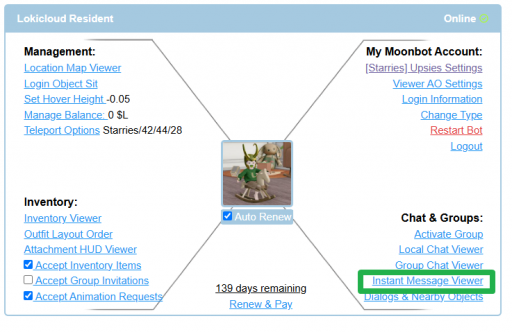
The IM Chat Viewer is a premium MoonBots feature that lets you see and respond to every instant message your bot receives, right from the web control panel. Instead of logging into Second Life to check on your bot's conversations, you can manage all of its IMs from anywhere.
This is especially handy if your bot represents a store, an event, or a service, since people will often IM it directly with questions.
The IM Chat Viewer is perfect for:
The left side of the Chat Viewer lists everyone who has messaged your bot, along with a preview of the most recent message and how long ago it was sent. Click any conversation to open the full message history on the right.
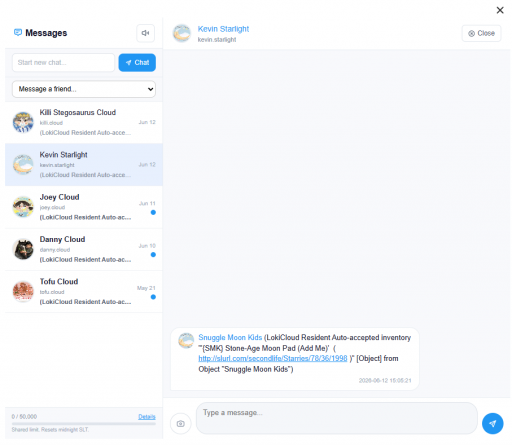
To reply, click into a conversation, type your message in the text box at the bottom, and send it. Your reply goes out as an IM from the bot, just as if you had typed it in world.
Use the Start new chat field at the top of the Messages panel to begin a conversation with a resident who hasn't messaged the bot yet.
Messages are shown in the order they were received, with the newest conversations at the top.
Notecards and inventory offers made through IM (such as vendor notecards) appear in the chat history as system messages.
The IM Chat Viewer reflects your bot's real inbox, so anything you send or receive here also happens in world.
Important
The IM Chat Viewer is a premium feature. It's available to bots on a premium plan and will not appear on the control panel for standard bots.
You can add managers to your bot who can reply to IMs as the bot. This makes it easy to share customer service and event management duties with a team instead of handling every conversation yourself.
A few cookies keep you logged in and block bots, so those always run. Everything else stays off until you allow it: loading PayPal checkout, and any analytics we might add later. See our Cookie Policy.
Turn each purpose on or off. Nothing outside "strictly necessary" runs until you allow it, and you can change this whenever you like from the Cookie Settings link in the footer.
Keeps you logged in, protects the site from bots and abuse, and remembers settings you have deliberately changed, such as dark mode. Without these the site does not work.
PHPSESSID (login session, ends when you close the browser), cf_clearance (Cloudflare bot protection, 12 months), mb_consent (stores this choice, 6 months), theme and wm_dismissed (written only when you switch the theme or dismiss a notice, so they record a choice you made)
Loads PayPal so you can add funds to your wallet. PayPal stores data on your device to process the payment and detect fraud. If this is off, the PayPal checkout will not load until you allow it.
__paypal_storage__ and related PayPal storage, set by paypal.com
Measures which pages get used so we can improve them. Off by default and not in use today. The toggle is here so nothing can start without asking you first.
None in use today
Builds a profile of your interests to show you ads elsewhere. Off by default and not in use today.
None in use today
 MoonBots
 [Starries]