If your bot isn't coming online, the most common issue is an incorrect Second Life password.
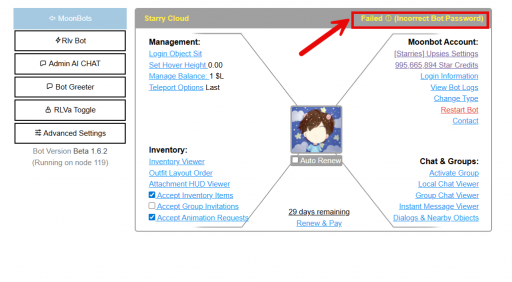
When you add a bot to MoonBots, we need the exact Second Life password for that avatar to log them in. If the password is wrong, your bot will stay offline.
Common password mistakes:
Typing the password incorrectly when setting up
Using YOUR password instead of the BOT's password
The bot's SL password was recently changed
Extra spaces before or after the password
Copying/pasting with hidden characters
Follow these simple steps to update your bot's login credentials:
Go to Moonbots.co and sign in with your account.
Locate the bot that isn't coming online in your bot list.
Click the "Manage Bot" button next to the offline bot.
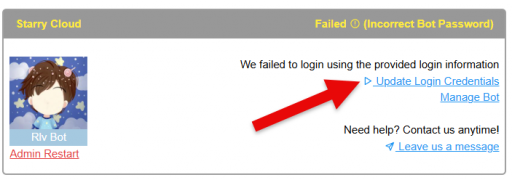

If you've updated the password correctly and your bot still won't come online, try these steps:
Log into Second Life directly with the bot's credentials to confirm:
Common mistakes:
If you're not sure of the bot's password:
Sometimes it helps to:
A few cookies keep you logged in and block bots, so those always run. Everything else stays off until you allow it: loading PayPal checkout, and any analytics we might add later. See our Cookie Policy.
Turn each purpose on or off. Nothing outside "strictly necessary" runs until you allow it, and you can change this whenever you like from the Cookie Settings link in the footer.
Keeps you logged in, protects the site from bots and abuse, and remembers settings you have deliberately changed, such as dark mode. Without these the site does not work.
PHPSESSID (login session, ends when you close the browser), cf_clearance (Cloudflare bot protection, 12 months), mb_consent (stores this choice, 6 months), theme and wm_dismissed (written only when you switch the theme or dismiss a notice, so they record a choice you made)
Loads PayPal so you can add funds to your wallet. PayPal stores data on your device to process the payment and detect fraud. If this is off, the PayPal checkout will not load until you allow it.
__paypal_storage__ and related PayPal storage, set by paypal.com
Measures which pages get used so we can improve them. Off by default and not in use today. The toggle is here so nothing can start without asking you first.
None in use today
Builds a profile of your interests to show you ads elsewhere. Off by default and not in use today.
None in use today
 MoonBots
 [Starries]